
This page has been reviewed and updated as of May 2026.
Search engine optimization is an evolving discipline rooted in both best practices and trending strategies.
That said, SEO has changed dramatically over the years.
Search engines are more sophisticated, search results are more dynamic and AI-powered experiences are changing how people discover information on their search journeys.
At the same time, the fundamentals of SEO still matter.
Your website must be technically sound and the content must be useful and trustworthy. That’s where an SEO checklist can help.
This guide brings together the essential tasks, best practices and priorities that support better visibility in search.
Whether you’re launching a new website, auditing existing pages or refining an enterprise SEO program, this checklist can help you focus on the areas that matter most.
One checklist can’t cover everything, but this one is close: with more than 50 SEO categories that will improve how people and search engines find and use your site.
What’s Changed in SEO Recently?

SEO has gone through many major shifts over the years, but the rise of generative AI is one of the most significant changes to search in a very long time.
The current shift began accelerating in late 2022 with the public release of OpenAI’s ChatGPT, which brought large language models (LLMs) into mainstream use almost overnight.
Soon after, search engines began integrating generative AI directly into the search experience.
In February 2023, Microsoft launched AI-powered experiences in Bing using OpenAI technology.
Then, in May 2023, Google introduced its experimental Search Generative Experience (SGE). By May 2024, Google formally launched AI Overviews in U.S. search results, moving generative AI from an experiment into the core search experience.
While many businesses panicked as traffic dropped from yet another “zero-click” experience courtesy of Google, many others saw the opportunities available to them. Opportunities that include targeting the entire rest of the SERP.
Long before AI Overviews appeared, SEO had already evolved beyond the traditional “10 blue links.” Of course, there’s an array of SERP features, including featured snippets, local packs, image results, video carousels, shopping experiences, People Also Ask boxes and much more.
Now more than ever, successful SEO is focused on maximizing visibility across these search features.
This is where businesses need to understand which areas of the search results matter most for their audience and business goals, then double down by allocating resources accordingly.
And the “10 blue links” still matter. Research highlighted by Adam Gnuse at Search Engine Land shows that traditional organic rankings still play a critical role in driving traffic, even as AI Overviews expand across the SERP.
At the same time, rankings alone no longer tell the full story of search visibility today. Many are beginning to view visibility within AI Overviews as a potential branding opportunity, even when clicks are limited.
This shift is changing how SEO professionals approach optimization as they repackage SEO best practices to target features like AI Overviews.
AI-driven search systems appear to rely more heavily on semantic relationships, topical organization and machine-readable structure to identify relevant information.
In summary, to win at search today, you need to understand the evolving search results, then identify the opportunities that matter most in those search results for your brand and then build a strategy that supports long-term discoverability.
Content Optimization

1. Target Audience Research
Know your target audience, their questions and their pain points. Knowing what questions and types of queries they might ask Google helps inform your keyword research.
This, in turn, will help you create content that answers those questions and solves their pain points. (You’ll use the topics, questions and search behaviors you uncover to guide your content strategy and search visibility efforts — but more on that shortly.)
One great way to get to know your target audience is to create a sample of it and then interview them. There are many ways to go about this — either manually in-house or by outsourcing to a third party.
Successful SEO requires understanding not just what people search for, but also what they are actually trying to accomplish.
For example, are they:
- Researching a topic?
- Comparing products or services?
- Trying to solve a problem quickly?
- Ready to make a purchase?
- Looking for local providers or reviews?
Understanding intent helps you create content that aligns with the types of pages and search experiences Google is most likely to surface for a query.
It’s also important to understand how your audience interacts with the search results. Users may discover your brand through traditional organic listings, featured snippets, local packs, videos, image results, People Also Ask boxes or AI-generated search experiences.
This means audience research is no longer only about identifying keywords. It’s about understanding the broader search ecosystem that your audience uses to discover information, evaluate their choices and make decisions.
2. Keyword Strategy and Research
If you want to catch fish, you need to know two things: what bait the fish are biting and where the fish are swimming. Content and keywords work together to attract and convert your fish.
Keyword research needs to be an ongoing process.
It begins by:
- Understanding how your audience searches.
- What they are trying to accomplish.
- How search engines interpret the topic you want to target .
You can do this by using your preferred tools. Dozens of good ones are out there, including our SEOToolSet®, Google Ads Keyword Planner, Semrush, Ahrefs and more.
When researching a keyword or topic, study the search results carefully. The SERP provides clues about what search engines believe best satisfies the query and what types of content users expect to see.
View the top results, the “People Also Ask” questions and the rest of the search engine results. Analyze whether the results are informational, transactional, local or navigational.
Look at what formats appear, what subtopics competitors cover and which SERP features dominate the page. Then create content that aligns with the intent behind the query while offering unique value.
Understanding which search features appear for a query can help you determine where visibility opportunities exist and which content formats may perform best.
Competitor research is also a big part of keyword strategy. Analyze which topics competitors cover, how they structure content and where they are earning visibility throughout the SERP.
This can help identify content gaps.
Finally, map your keywords. This means organizing primary and secondary keyword themes, related topics and supporting concepts across specific pages and sections of your site.
This is something you will be sure to do if you implement SEO siloing, as discussed in No. 10 a little later.
Be sure to check out:
3. Quality Content
Quality content is a foundational step in any SEO checklist.
Google’s algorithms continue evolving to better identify content that is genuinely useful and trustworthy.
Updates like Google’s helpful content system, announced in 2022, were designed to reduce the visibility of low-value, unhelpful or search-engine-first content in the search results.
This means SEO content should focus less on simply producing large amounts of content and more on creating content that demonstrates experience, expertise and genuine value.
Google’s E-E-A-T principles — experience, expertise, authoritativeness and trust — can help guide content quality efforts.
While E-E-A-T is not a direct ranking factor, these principles help explain the types of signals Google’s systems aim to reward, especially for topics where accuracy and trust matter most.
That said, avoid thin content whenever possible. Instead, focus on comprehensive topic coverage, clear organization and content that helps users accomplish what they came to do.
Rather than creating isolated pages targeting every keyword variation, develop content ecosystems that thoroughly cover important topic areas and clearly connect related content through thoughtful internal linking.
Search engines also increasingly evaluate how well the content aligns with user expectations. For example, some searches may require:
- In-depth educational content.
- Quick answers.
- Comparison pages.
- Product-focused landing pages.
- Local information.
- Videos or visual content.
Content should also align with where users are in the customer journey and what action they may want to take next.
For instance:
- Informational content may support newsletter signups or additional learning.
- Comparison-focused content may help users evaluate solutions.
- Transactional pages may support purchases or lead generation.
As a closing note, be thoughtful about using AI to generate SEO content. AI-generated content tools can support brainstorming, outlining, research assistance and workflow efficiency, but they are not a replacement for editorial oversight, subject matter expertise or quality control.
Publishing large amounts of low-value AI-generated content without meaningful review or added value can create quality issues and may undermine long-term search performance.
Before publishing your content, ask:
- Does this provide original value?
- Does it clearly satisfy search intent?
- Is the information accurate and current?
- Does it demonstrate experience or expertise?
- Is it more useful than competing content?
- Does it help users take an appropriate next step?
The goal of SEO content is to build visibility, trust and usefulness for the people you want to reach.
For more, see: The Complete Guide to the Basics of Google’s E-E-A-T.
4. Featured Snippet Opportunities
As you conduct keyword research, you might find that Google displays a featured snippet (aka answer box) above the search results for your targeted keyword (also known as “position zero”).
Featured snippets are one of several SERP features that can increase visibility, reinforce authority and help users quickly find answers to their questions.
These snippets often appear for:
- Question-based searches.
- Definitions.
- Comparisons.
- Step-by-step processes.
- Lists.
- Tables.
- Informational summaries.
To increase your chances of earning a featured snippet, structure your content clearly and organize answers in a way that is easy for both users and search engines to understand.
Depending on the query, this may include:
- Concise question-and-answer formatting.
- Bulleted or numbered lists.
- Tables.
- Well-structured headings.
- Short explanatory paragraphs.
- Video content.
You may be able to increase your chances of securing a featured snippet spot by applying schema markup, but it’s not required (see “More Structured Data” below).
Tools such as Semrush, Ahrefs and inLinks can help identify featured snippet opportunities, monitor SERP features and analyze how content appears across search.
5. Word Count
The amount of content needed on a webpage can vary by topic, keyword, competition and the intent of the query. (The graphic below outlines the three main intents behind search queries.)
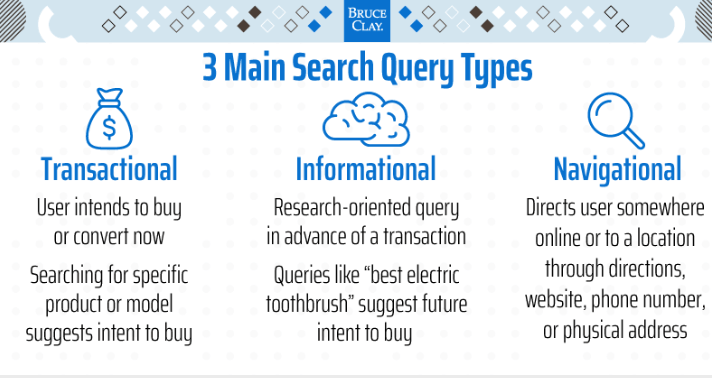
How many words is enough? There’s no black-and-white rule. In fact, Google has been saying for a while now that word count doesn’t matter.
But I believe it’s more nuanced than that. If you analyze the search results for different keyword types, you’ll find that some require more content on a topic than others.
To determine an approximate minimum page length, look at the top-ranked URLs for your target keyword. How long are those pages?
A tool like our SEOToolSet Multi Page Analyzer is handy for this kind of competitive analysis. Our WordPress SEO plugin also provides this data.
Averaging the top competitors gives you a ballpark for what a search engine considers the normal word count for that topic.
It’s safe to say that informational webpages almost always warrant more text.
6. Call to Action (CTA)
For each of your pages, ask yourself what the user would need or want to do from here. Then make it easy to do!
Your key pages should clarify what primary action a visitor can take next:
- The CTA should be prominent on a product page (for example, “add to cart” or “start a free trial”).
- On a service page, the CTA might be “call us” or “get a quote.” Make the CTA clear and easy to select.
- On the homepage, help the visitor take the next step in your conversion funnel.
- The actual language of a CTA should be active (usually an imperative verb). The placement and design of the CTA should draw the visitor’s attention. But test variations to see what works best for you.
A page doesn’t have to be transactional to warrant a call to action.
If an informational page is a top-performing traffic driver, such as a blog post (like this one) that answers a common question or an FAQ page, the call to action might encourage the visitor to “find out more” and enter the conversion funnel or to tell friends.
(If you find this SEO checklist helpful, please consider sharing it!)
7. Content Freshness
Periodically review your content, such as main webpages and blog posts, to ensure the information is current.
For example, we regularly refresh this checklist. SEO best practices must evolve as search engine guidelines and technology do. If your industry also moves quickly, your content needs to keep up.
Google agrees. From Google’s Search Quality Rater Guidelines:
“The HM [highest meets] rating is not appropriate if a page is untrustworthy or has any other undesirable characteristics, such as outdated or inaccurate information. There are very high standards for the HM rating.”
The HM rating is one of the highest possible ratings a Google quality rater can assign to search for a query. It means the result is highly satisfying for the user’s needs and intent.
8. Homepage Content
Your homepage acts as a central hub, helping both users and search engines understand who you are, what your business offers and which topics are most important on your site.
It also passes authority to the top pages on your site through internal links.
Because of its role, it’s important to maintain clear, consistent messaging about your brand, products, services and primary topic areas on the homepage.
Modern homepages may include dynamic elements such as featured articles, promotions, rotating content or recent updates. These features can support engagement and usability.
However, the core focus of the homepage should remain clear and easy to understand. The homepage should reinforce your primary services or offerings, important topic areas, your brand identity, key navigation paths and key conversions.
9. Duplicate Content
Search engines try to identify the most relevant version of content to display in search results.
When multiple versions of similar or identical content exist, it can create confusion about which URL should rank.
Duplicate content does not necessarily result in a penalty, but it can create SEO challenges related to indexing, canonicalization, crawl efficiency, diluted ranking signals and more.
What often can happen is a search engine will filter out the dupes if you have duplicate content within your site.
Only one URL will display in the results, and the page that Google chooses might not be the page that you want to rank.
One option is to use a “canonical tag” to tell search engines which version should be indexed.
Here’s more on duplicate content.
10. SEO Siloing
SEO siloing is the practice of organizing related content into clear topic areas that help both users and search engines better understand your website.
Effective siloing is about creating strong topical relationships between pages through logical site architecture, clear navigation, internal linking and organized topic coverage.
The goal is to build content ecosystems around important topic areas.
For example, a primary landing page may cover a broad topic, while supporting pages explore related subtopics, questions, comparisons and deeper educational content. These pages should connect naturally through internal linking or directory structures.
When done well, siloing supports both user experience and search visibility.
For more, check out: SEO Siloing: What, Why, How.
On-Page Optimization

Review each important page, from the homepage to a high-priority product page, with an eye to the following issues in this on-page SEO checklist.
11. Title Tag
The HTML title tag remains an important on-page SEO element. It helps search engines understand the topic of a page and often serves as the clickable headline displayed in search results.
Each page on your site should have a unique title tag that reflects the primary focus of the page. Concise titles generally perform better for usability and display purposes, while overly long titles may be truncated or rewritten in the SERP.
Google may rewrite titles in search results, too, but it does not rewrite the HTML on the site, so the title tag remains an important way for search engines to interpret the page.
A well-crafted title tag may also stand a better chance of being displayed in the search results exactly how you want it to be.
Both the title and description text can influence clicks to your site, so focus on writing compelling tags. You don’t want to waste your prime real estate in the SERP.
For more, read:
12. Meta Description Tag
The meta description tag gives search engines and users additional context about a webpage and may influence clicks from the result in the SERP.
Each important page on your site should have a unique meta description that summarizes the page’s content and communicates its value to searchers.
A strong meta description should accurately describe the page, align with search intent and include key terms naturally.
Shorter and more concise descriptions often display more consistently across devices and search experiences. Overly long descriptions may be truncated or replaced.
Note that Google might generate its own search snippet dynamically based on the query and the page content.
This often happens when Google believes another portion of the page better matches the user’s search intent.
Because of this, the page content itself should also clearly communicate the page topic and key information.
See:
13. Heading Tags
Headings allow website users to see a page’s main sections and points.
They give visual cues for how body content is organized and signal to search engines and website users what topics are covered on a page.
Headings can also help improve semantic understanding for search engines.
The following heading tags can be
, , , etc., and should be used like a page’s table of contents. You may have more than one
, etc., and should be used like a page’s table of contents. You may have more than one
according to Google, though we recommend only one in most cases.
In many CMS platforms, including WordPress, the page or post title is often automatically output as the
And be sure not to use heading tags to control font sizes as that may confuse search engines. Instead, use CSS to control style, and headings to describe content organization.
Navigation elements and other global text should be styled with CSS and not heading tags.
For more on heading tags, check out: What Are Heading Tags and Why Are They Important to SEO?
14. Keyword Optimization
Do you have to do keyword optimization? Not in the old-fashioned sense of forcing exact-match keywords onto a page. But strategically reinforcing a page’s topic and relevance still matters.
First, let’s discuss the elephant in the room: keyword optimization can seem outdated.
Search engines today are much better at understanding context, semantics and topical relationships than they were years ago.
However, all else being equal, if you spent a little more time than the competition making sure that your content clearly reinforces its primary topics, do you think you might have a better chance of ranking than the competition?
Keyword optimization today is less about repetition and more about clarity. As you optimize your pages, think about:
- The primary topic terms.
- Any related concepts and entities.
- Supporting terminology.
- Commonly associated questions and subtopics.
- Language that aligns with search intent.
At the same time, avoid over-optimization, which can include excessive keyword repetition or awkward phrasing.
15. Image Optimization
Images greatly enhance your pages. Content needs visual elements to break up the text and keep readers interested.
Images can also improve accessibility, reinforce topical relevance and create additional visibility opportunities across Google Images and blended search results.
However, images can slow down a page’s loading time. To improve performance, optimize images for both quality and file size.
Resize images before uploading them, compress files whenever possible and serve modern image formats that reduce file weight without affecting visual quality.
Including width and height attributes can also help reduce layout shifts and improve user experience.
Image formats such as WebP and AVIF can help significantly reduce page weight and improve loading performance on supported browsers.
File names should describe the image and include a relevant topic term when possible. You can also optimize the caption and the text surrounding an image to reinforce its content.
Don’t overlook image alt text (see next section). Alt text helps improve accessibility for users with screen readers and also provides search engines with additional context about the image.
For more, see: How to Improve Google Image Search Ranking.
16. Alt Attributes
Make sure to include an alt attribute with each image. Accessible websites help users with disabilities to understand and interact with content.
Well-written alt text can also help search engines better understand image relevance and support visibility in image search results.
Organizations such as the W3C and Google recommend using descriptive alt text to provide text alternatives for images when appropriate.
As an SEO checklist item, ensure that your images include accurate and descriptive alt text that naturally includes important topic terms when appropriate.
Avoid keyword stuffing or writing alt text solely for SEO purposes.
If an image is purely decorative, it should still include an empty alt attribute within the image tag. This helps assistive technologies understand that the image does not provide meaningful content.
For more, review:
17. Video Optimization
Videos are powerful engagement assets that can help keep visitors engaged longer on a page. Video content can also support search visibility by creating opportunities to appear across multiple search surfaces.
That’s because Google increasingly surfaces video content throughout the search experience, including video carousels, featured snippets, blended search results and platform-specific search experiences such as YouTube.
Video can be especially effective for instructional, product-focused and how-to content.
Optimize video content so search engines and users can better understand what the video is about. Video optimization practices include:
- Descriptive titles and filenames.
- Video descriptions.
- Structured data where appropriate.
- Accurate captions and transcripts.
- Custom thumbnails.
- Relevant surrounding page content.
- Logical placement within the page.
Like images, embedded videos can slow down a page’s load time. Use performance best practices such as lazy loading, responsive embeds and optimized hosting configurations to help minimize video impact on page performance.
18. Structured Data Markup with Schema
Structured data clarifies for the search engine what the content on your page is about. Adding schema markup based on the standards at Schema.org provides machine-readable information about the entities, topics and relationships on your site.
For example, you could use structured data markup to indicate an upcoming event your business is hosting, specifying its date, time, location and other details.
When implemented correctly, structured data may help search engines better interpret your content and make your pages eligible for enhanced search features in the SERP.
Structured data may also help reinforce topical relationships and contextual understanding across your website.
Dozens of schema types may apply depending on the content you have on your site. Depending on the content on your site, common schema types may include:
- Article schema.
- FAQ schema.
- Product schema.
- Video schema.
- Event schema.
- Breadcrumb schema.
- Organization schema.
- Local Business schema.
Google supports three formats for marking up a website:
- JSON-LD (recommended).
- Microdata.
- RDFa.
As a technical SEO checklist item, ensure that your structured data includes all required properties and follows Google’s structured data guidelines.
To make sure you’ve done it right, check your page or code snippet using Google’s Rich Results Test and the Schema Markup Validator.
For more, check out:
19. Content Structure and Formatting
Well-structured content can help both users and search engines better understand the information on a page.
Formatting improves readability while also helping search engines interpret important topics, relationships and answers within the content.
Content formatting may include:
- HTML tables.
- Bulleted lists.
- Ordered lists.
- Breadcrumb navigation.
- Table of contents at the top (especially with anchor links).
- Headings that contain a key term or question, followed by the answer in the body text.
- Question-and-answer formatting.
- TL;DR (“too long, didn’t read”) summary near the top of your article.
20. Social Meta Tags
Social meta tags help control how your content appears when shared across social platforms, messaging apps and other link-preview scenarios.
These tags provide information such as page titles, descriptions, preview images and content types.
Platforms such as Facebook, X, LinkedIn, Pinterest, Slack and other applications commonly use this metadata to generate link previews when people share URLs.
Social meta tags can help improve presentation and branding, encourage clicks and create more consistent sharing experiences.
The most commonly used social metadata standards include:
To improve how your content appears when shared, use clear titles and descriptions, include high-quality preview images, ensure metadata is accurate and optimize images for social display formats.
21. URL Optimization
As a minor but important task in your SEO checklist, URLs play a role in usability, content organization and search understanding.
A concise, descriptive URL can help reinforce topical relevance and site organization for search engines.
Keep URLs concise, descriptive, readable and logically organized. One study by Backlinko found that short URLs tend to have a slight ranking advantage.
For example, don’t do this:
www.acmewidgets.com/T&Xyhtbhyd8ut
Instead, do this:
www.acmewidgets.com/blue-widgets
Use hyphens to separate words in URLs rather than underscores. Search engines interpret hyphens as word separators, helping improve readability and clarity.
You’ll want to avoid frequently changing URLs unless necessary. Doing so can create additional complexity around redirects, indexing and link equity consolidation.
URL structure is also important when doing SEO siloing (see No. 10 in this list).
22. Absolute vs. Relative URLs
Search engines can generally process both relative and absolute URLs correctly.
However, using consistent URL structures across your site can help reduce technical confusion and improve maintainability.
For more, see: Absolute vs. Relative URL Linking — What’s the Big Deal, Anyway?
23. Make JavaScript and CSS External
JavaScript and CSS can significantly affect page performance, rendering and overall user experience.
Delivering resources efficiently is important so content loads quickly and remains accessible to both users and search engines.
But there is a tradeoff to consider especially in light of Core Web Vitals.
In some cases, keeping small amounts of important CSS or JavaScript directly on the page can help content load faster by reducing the need for additional file requests.
Local Optimization

Businesses with a local brick-and-mortar presence or local service areas have a special set of SEO factors to consider. Here are a couple of important local SEO checklist items.
24. Claim Google Business Profile
A Google Business Profile listing is free and is a critical first step for local brick-and-mortar businesses and businesses with service areas.
An optimized profile can help your business appear in Google Maps, local pack search results, local business panels and branded search results.
For many businesses, Google Business Profile visibility is one of the primary ways that customers discover, evaluate and contact a business online.
For more:
25. Local Schema Markup
Local businesses can benefit from on-page schema markup related to their business.
Using LocalBusiness schema and related schema types from Schema.org can help provide machine-readable details such as:
- Business name.
- Address.
- Phone number.
- Website.
- Business hours.
- Service areas.
- Business categories.
- Geographic information.
Especially important for all businesses is to ensure the business’s name, address, phone number and website are marked up correctly, and that this information is consistent across the web, including a Google Business Profile and other online listings.
Check out schemas at Schema.org.
26. Local Citations and Links
Local citations are online mentions of your business information across directories, review platforms, local websites and other online sources.
At a minimum, an online citation should include the business name, address and phone number as well as the website address. Many directory sites offer opportunities for additional business information, as well.
Consistent business information across platforms can help reinforce trust and help search engines better understand and validate your business details.
Local links, on the other hand, are different from citations because they involve actual links from other locally relevant websites.
Both citations and local links help establish your local presence.
Check out the Local SEO Checklist.
Mobile Optimization

We’re living in a mobile-first world. Businesses need to ensure that their websites cater to the mobile browsing experience.
Google looks at the mobile version of your content when it comes to indexing and ranking.
Because of this, it’s important that your mobile experience provides accessible content, fast-loading performance, intuitive navigation, readable text, usable interactive elements and a consistent experience across devices.
Even if your site is primarily managed on desktop, the mobile experience still plays a critical role in search visibility and usability.
As an SEO checklist to-do, make sure you’re using a mobile-first strategy. Here are some specifics.
27. Mobile Usability
Search engines prioritize websites that provide a strong mobile user experience.
Google recommends responsive design because it helps ensure content adapts consistently across different screen sizes and devices.
Mobile usability also includes:
- Responsive layouts.
- Readable font sizes.
- Tap target spacing.
- Navigation usability.
- Intrusive interstitials.
- Page rendering.
- Mobile page speed.
- Visual stability.
You can evaluate mobile performance and usability using tools such as:
Mobile optimization is closely tied to Core Web Vitals and overall page experience. Slow-loading or unstable mobile pages can negatively affect usability, engagement and search visibility.
See the Page Speed and Performance section in this SEO checklist for more on page speed.
28. Conversational and Voice Search Queries
Search behavior continues to evolve beyond short keyword phrases. Users increasingly search using conversational language, voice assistants and multimodal search experiences.
Because of this, content should account for the way people naturally ask questions and seek information.
Consider:
- How users phrase questions conversationally.
- Whether your content clearly answers common questions.
- How local intent influences searches such as “near me” queries.
- How your content appears in mobile and voice-assisted search experiences.
In your content, focus on using natural language, providing clear answers, ensuring topical completeness, using structured content for clarity and interweaving local relevance when applicable.
Technical SEO and Site Performance

Technical optimization plays an important role in site performance, usability and search visibility.
Search engines also evaluate how efficiently websites load, render and function across devices and network conditions.
The following technical SEO considerations can help improve page experience, crawlability and overall site performance.
29. HTTPS
Using HTTPS is a standard best practice for websites. Secure connections help protect data transferred between users and a website, and strengthens user trust.
Protocols such as HTTP/2 and HTTP/3 can help improve connection efficiency and performance on supported servers and browsers.
Google has long used HTTPS as a lightweight ranking signal and continues to emphasize secure browsing as part of a positive page experience.
Ensure that:
- All important pages resolve securely over HTTPS.
- All site resources load securely over HTTPS, including images, scripts and other embedded files.
- Any HTTP pages properly redirect to HTTPS versions.
- Canonical tags and sitemaps reference HTTPS URLs.
30. No Intrusive Interstitials
Intrusive interstitials are pop-ups, overlays or other elements that interfere with a user’s ability to access the main content of a page.
Some interstitials are necessary for legal, privacy or security reasons. In most cases, you’ll want to avoid any designs that make it difficult to access the main content immediately.
31. Core Web Vitals
Core Web Vitals are performance metrics that Google uses to evaluate aspects of page experience and usability.
The current Core Web Vitals metrics at the time of writing include:
- LCP (Largest Contentful Paint).
- INP (Interaction to Next Paint).
- CLS (Cumulative Layout Shift).
These metrics measure how quickly content loads, how responsive a page feels and how visually stable the page remains as it loads.
Strong scores for Core Web Vitals can help improve a website’s user experience, especially on mobile devices and slower network connections.
You can review your scores using the Core Web Vitals Report in Google Search Console along with tools such as PageSpeed Insights and Lighthouse.
32. Technical Maintenance
Monitor your website for technical issues such as 404 errors, improper 301 redirects, crawl issues, broken links, indexing errors and server response issues.
Also keep your CMS, plugins, themes and server software updated to reduce the risk of vulnerabilities and performance issues.
Google Search Console and other technical SEO tools can help identify many of these problems.
Maintaining a secure and technically sound website supports usability, trust and long-term search performance.
33. Page Speed and Performance
Page speed and performance impact the usability of a site and engagement levels. You’ll want to evaluate your website’s performance using tools such as:
These tools can help identify issues related to loading performance, render-blocking resources, large page assets, JavaScript execution, layout shifts and caching opportunities.
Note that performance optimization should focus on improving the real user experience, not just achieving perfect scores in testing tools.
Sitewide SEO

Beyond what we’ve covered so far, there are sitewide optimizations that help support search visibility, usability and technical accessibility across a website. The following checklist items can help strengthen your overall SEO foundation.
34. Contact Information
Make it easy for users to find business contact information on the site. Search engines expect that a trustworthy site will provide this for users.
35. Testimonials
Testimonials and reviews on a website highlight the customer experience and the value a business provides.
When possible, display testimonials and reviews in crawlable text rather than embedding them only within images or graphics.
Structured data markup may also help search engines better understand review-related content and can make pages eligible for certain review-related search enhancements.
Be sure that any reviews or ratings displayed on your site follow Google’s structured data and review content guidelines.
36. Privacy Statement
A privacy statement lets site visitors know what you’re doing with any data you collect about them.
Every site should have an easy-to-find privacy policy that explains things such as data collection practices, cookies and tracking technologies, analytics usage, contact forms, advertising or remarketing practices and third-party data sharing.
We link ours in the footer of our site:
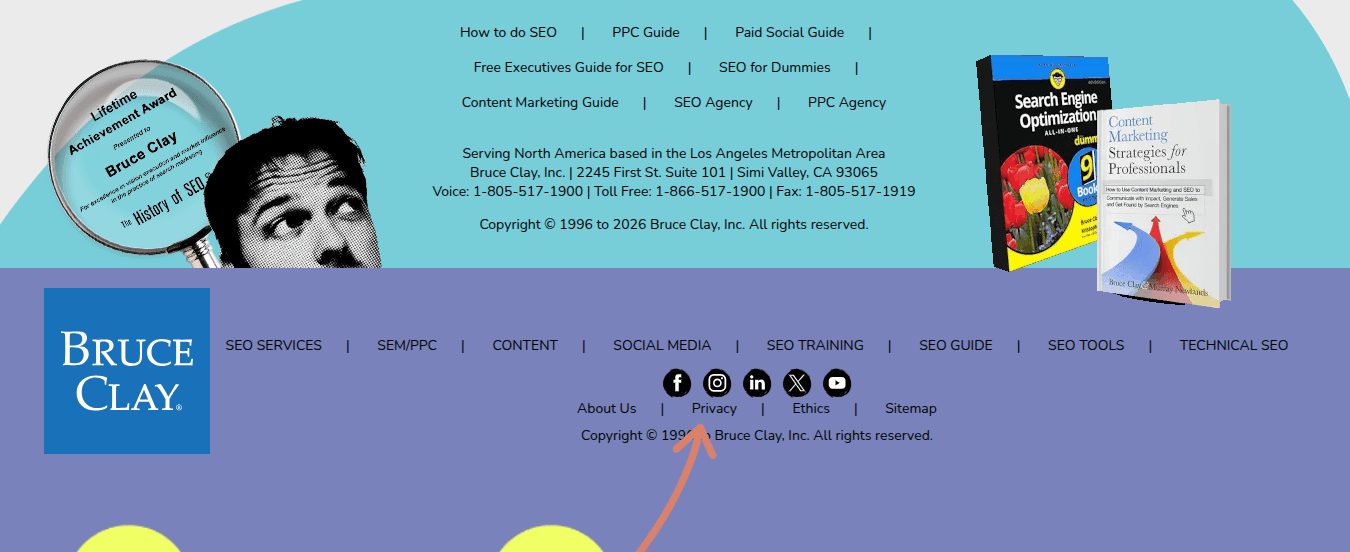
Privacy compliance requirements continue to evolve across the globe. Depending on where your users are located, your site may need to comply with regulations such as:
- GDPR (General Data Protection Regulation).
- CCPA/CPRA (California privacy laws).
- Other regional or industry-specific privacy requirements.
Be sure to research the privacy laws where your site visitors are located and make sure your website complies.
37. Navigation and Internal Linking
Site navigation helps users and search engines better understand your website structure and content hierarchy. Here are some tips:
- Ensure that all your important pages can be reached through crawlable text links and that your navigation is accessible across devices.
- Breadcrumb navigation can also help reinforce site structure and improve user experience within the website. When appropriate, consider implementing breadcrumb structured data to help search engines better interpret page relationships.
- Internal links between related pages help users and search engines discover additional content while also reinforcing contextual relationships.
- Tip: Avoid relying solely on images or scripts for critical navigation elements if they reduce crawlability or accessibility.
For more, check out: A Jam-Packed Guide on Internal Linking for SEO.
38. Sitemaps
HTML sitemaps can improve usability and help people discover important pages. We link our HTML sitemap in the footer of our site as a best practice:
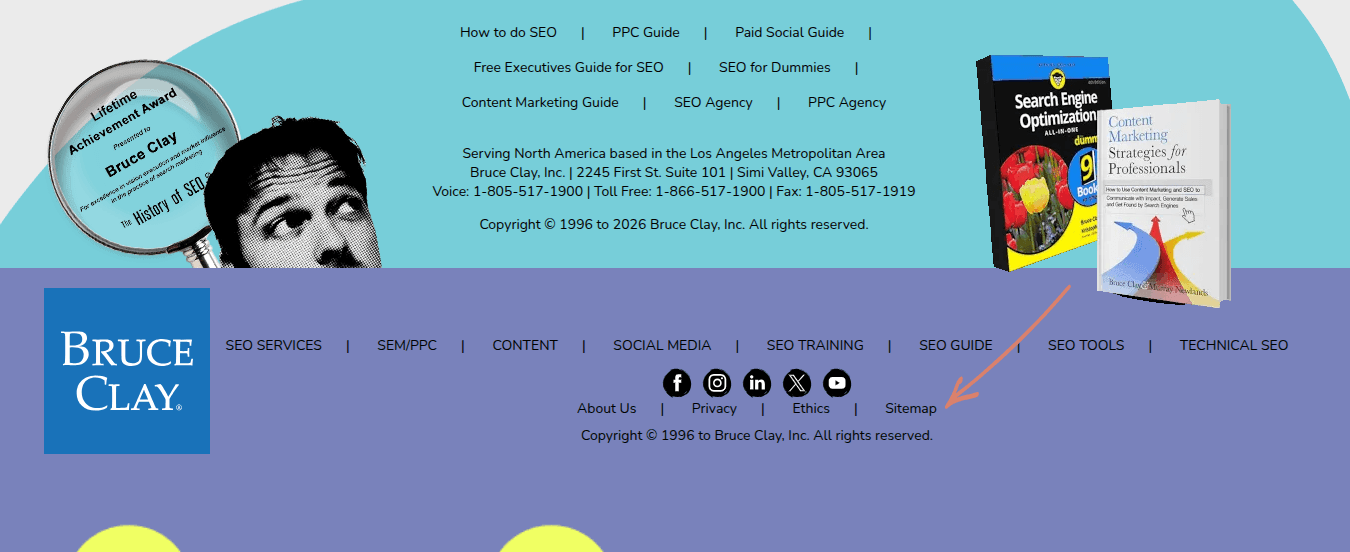
XML sitemaps, on the other hand, help search engines discover and understand pages on your website.
You’ll want to maintain an up-to-date XML sitemap that includes key indexable URLs and submit it through tools such as Google Search Console and Bing Webmaster Tools.
Make sure to review your sitemap on a regular basis to ensure it contains current URLs, excludes redirected or broken pages, reflects your preferred canonical URLs and stays aligned with your site structure.
Large websites can benefit from multiple sitemaps that are organized by content type or site section.
See: What Is an XML Sitemap and How Do I Create One?
39. Robots.txt File
The robots.txt file helps control how search engine crawlers access certain areas of your website. This file must exist, even if it’s empty.
Some things to know:
- Blocking a page in robots.txt does not necessarily prevent it from being indexed if search engines discover the URL through other sources.
- The robots.txt file should include the location of your XML sitemap to help search engines discover important URLs more efficiently.
- Make sure the file doesn’t accidentally exclude important files, directories or the entire site (this has been known to happen!).
For more on this, see:
40. Linking Strategy
As part of any good SEO checklist is the website linking strategy. Both internal and external linking remain important in SEO and user experience.
For internal linking, a strong structure helps organize content, reinforce topical relationships, distribute authority throughout the site and improve content discovery.
The internal linking strategy should support overall site architecture and topic organization.
External links and inbound links, on the other hand, develop naturally through high-quality content, partnerships and other marketing and business activities.
Search engines continue to evaluate link quality, and while inbound links remain important, place greater focus on overall content quality and website usability.
As part of site maintenance, monitor your link profile regularly.
Check out:
41. Static URLs
Search engines can usually handle dynamic URLs and query parameters effectively.
But overly complex URL structures can still create issues like duplicate content, crawl efficiency, indexing and URL management.
Pay attention to situations when multiple URLs display substantially similar content, tracking parameters create duplicate URLs, faceted navigation creates excessive crawlable or duplicate URL variations or important pages are difficult to crawl or index.
Canonical tags can help indicate the preferred version of a page when similar or duplicate URLs exist.
Make sure to periodically review how search engines crawl and index parameterized URLs.
See:
42. No Spam Tactics
Ensure your SEO strategy follows Google Search Essentials and Bing Webmaster Guidelines.
If ever in doubt about the validity of your SEO, you can also refer to Google’s Search Engine Optimization Starter Guide.
But be sure to have a professional SEO agency or consultant help you translate their recommendations into modern SEO strategies.
Companies that have hired cheap SEO consultants in the past may have fallen prey to SEO tactics that do more harm than good.
In these cases, websites need to do the repair work before they can once again gain visibility.
SEO and Webmaster Tools

SEO tools and reporting help you monitor search visibility, review technical issues on your site, keep tabs on user behavior and analyze overall website performance.
But the key is not just collecting data; it’s being able to understand what the data is telling you so that you can prioritize SEO improvements that move the needle.
43. Analytics and SEO Platforms
Google Analytics (GA4) and other SEO platforms on the market are invaluable for monitoring your SEO progress.
Review the data in these tools to find out more about the site’s organic traffic trends, landing page performance, engagement metrics, any conversions, user behavior and technical issues
A ranking monitor (such as the ranking monitor in our SEOToolSet) is also useful for tracking SEO changes across search engines.
44. Webmaster Tools Accounts
Search engine webmaster tools like Google Search Console and Bing Webmaster Tools help site owners understand how search engines crawl, index and interpret their websites.
These free tools provide data on everything from search queries, indexing, crawl errors and sitemap processing to Core Web Vitals, manual actions and technical SEO issues.
For more:
45. SEO Plugins
Plugins make a WordPress site more SEO-friendly. Many exist, with both free and premium versions. Many people use more than one.
Check out the Bruce Clay SEO Plugin for WordPress users to find out more about ours.
46. Manual Actions Review
Search engines may issue manual actions when a site violates spam policies. Manual actions can negatively affect search visibility until the underlying issues are resolved and you’ve completed a successful reconsideration request.
Google reports manual actions within Google Search Console. You can review the Manual Actions report to find out more about manual actions that may be impacting your site.
Remember that not all ranking declines are caused by manual actions. Many performance changes can be due to algorithmic changes.
In those cases, you will not get a direct notification from Google on what happened.
Regularly monitor Search Console and maintain compliance with search engine guidelines as part of your ongoing SEO maintenance process.
For more, see:
47. Algorithm Updates and Search Updates Review
Search engines regularly update their ranking systems and search experiences, much to the dismay of SEOs everywhere.
These changes can affect search visibility, traffic and how content appears in search results.
You can monitor your website performance over time to identify any big changes in traffic, rankings, click-through rates or search visibility.
Tools like Google Search Console, analytics platforms and other SEO monitoring tools can help uncover patterns that coincide with search updates.
These tools can give you the data to help you figure out if traffic changes are due to evolving search intent, SERP layout changes, AI-generated search features, content quality systems, technical issues or even just increased competition.
If you see big drops or rises in traffic that coincide with any known algorithm updates — or if you receive a manual action notice from Google, your site will likely need improvements.
But rather than reacting to every algorithm update, long-term SEO success hinges on high-quality content, strong technical SEO and a positive user experience, not to mention following search engine guidelines.
For more, see: An Up-to-Date History of Notable Google Algorithm Updates.
Advanced SEO Methods

This section covers broader SEO strategies and ongoing optimization approaches that help websites adapt as search evolves.
48. Search Visibility and SERP Strategy
The traditional “blue links” matter, perhaps more than ever before as AI-powered search is reducing clicks.
That said, the search results offer a multitude of touchpoints — those that your brand can capitalize on.
A search result may include:
- AI Overviews.
- Featured snippets.
- Videos.
- Image results.
- Local packs.
- People Also Ask.
- Shopping results.
- News.
- Traditional organic listings.
Because search visibility is fragmented across many SERP features, your SEO strategies should account for the types of results that appear most often for your important queries.
Different queries may favor different content formats. For example, instructional queries may surface videos, while local queries often prioritize map results and business listings.
So understanding the composition of the search results page can help guide decisions around content format, content structure, media types, optimization priorities and visibility opportunities.
Prioritize the formats and search surfaces that are most relevant to your goals.
For more, check out: The search visibility framework: Dominating every corner of the SERP in 2026 [Search Engine Land].
49. AI Search
Traditional search generally evaluates and ranks webpages from its index based on factors such as relevance, links and keywords, although it’s a bit more sophisticated than that.
Nonetheless, AI-powered search works slightly differently. At the time of writing, Google’s AI-powered search technology for AI Overviews retrieves only a subset of search results and relies on lighter ranking signals.
We know this from court documentation provided in U.S. v. Google LLC.
Our understanding of how AI Overviews works is that it assesses the broader relationships between topics, entities and supporting content across an entire website.
This means AI SEO can benefit from how content is organized, connected and reinforced throughout a site.
This means proper site architecture, thoughtful internal linking, structured content and comprehensive topic coverage.
Ultimately, you should focus on SEO that supports both traditional search visibility and emerging AI-powered search.
Remember: traditional organic rankings still matter. But it’s even more important to understand new and old search features and how to cater to the touchpoints that matter to your brand.
50. Website Migrations
A website migration is a term used to describe when a website undergoes major changes.
Because of the complexity of a site migration and its ability to impact website traffic either in a profoundly good or bad way, it should always include the guidance of a professional SEO agency or consultant.
Some examples of a site migration include:
- Redesigning the website and changing the code.
- Renaming URLs.
- Consolidating webpages and implementing 301 redirects and/or URL changes.
- Changing domain names.
- Merging with another website.
- Rearranging the website structure/navigation.
- Moving a website from HTTP to HTTPS.
- Switching to a new content management system.
- Switching to a new hosting provider.
For more on how to handle this, see: Website Migration Dos and Don’ts to Avoid Disaster [on-demand webinar].
51. Content Refreshes and Expansion
Should you spend your time creating new webpages for SEO, or optimizing old ones? The answer is yes to both.
Publishing new content helps expand your search visibility and topical coverage, while refreshing older content helps maintain relevance, accuracy and competitiveness over time.
Content updates may include:
- Improving depth and clarity.
- Updating outdated information.
- Expanding topical coverage.
- Improving internal linking.
- Refreshing examples, statistics and references.
- Enhancing search intent alignment.
In many cases, refreshing and consolidating existing content can produce stronger results than continually publishing new pages alone.
We recommend spending about 50% of the time generating new pages and 50% optimizing and refreshing old pages so the website remains relevant.
For more, read:
52. Diagnosing SEO Performance Issues
There will likely be times when your website loses search visibility, traffic or conversions.
Performance changes can happen for a variety of reasons, including algorithm updates, changing search behavior, SERP layout and functionality, website technical issues, increased competition or content quality issues.
When performance changes happen, make sure to have a structured process for diagnosing the root cause.
SEO diagnosis often requires looking at the website holistically rather than focusing on a single metric.
For more, check out:
53. Technical SEO Audits
Regular technical SEO audits can help identify issues that may affect search visibility, crawlability, indexing and overall site performance.
It’s especially important to conduct a thorough technical audit after major events such as:
- Traffic declines.
- Website migrations.
- CMS changes.
- Redesigns.
- Large-scale content updates.
- Domain changes.
- Significant Google search updates.
For more, see: SEO Audits and Tools: The Good, The Better and The Best.
54. Continuing Education
Implementing the right optimization techniques requires a commitment to learning the foundation of SEO and staying up-to-date on trends and search engine changes.
This is why everyone — from beginner to advanced — benefits from continuous learning, be it through an SEO training class or online SEO training, books, publications, podcasts, webinars, conferences, local in-person events and more.
To learn more, check out:
Case Study

There is no single formula for SEO success. Effective SEO strategies often involve a combination of technical improvements, content development, search visibility optimization and ongoing refinement over time.
The right approach depends on many factors, including the website, the industry, the competition and the goals of the business.
The following case study shows how different SEO strategies can work together to improve search visibility, website performance and overall business outcomes.
166% Traffic Jump
Through technical analysis, on-page analysis, internal linking and a backlink audit, we implemented the following and boosted our client’s (National Drug Screening) organic traffic by 166%:
- Content siloing.
- Content improvements.
- Schema markup.
- Disavowed links.
- XML sitemaps.
- Canonicals.
- 301 redirects.
- Page experience, Core Web Vitals and speed improvements.
“Choosing Bruce Clay SEO services turned out to be the best decision for our website SEO and our business growth. We knew we could be doing better with SEO and needed to find answers for increased traffic and more sales. When the analyst at Bruce Clay exposed multiple points of failure, we realized change was needed fast. They along with our new web developers guided us through the whole process of developing and launching a new website, and when it did, our traffic more than doubled! Working with the Bruce Clay team is always a pleasure due to their highly professional project management and their expert analysis and advice. We’ve come to count on our Bruce Clay SEO as an essential part of our team.”
–Joe Reilly, President, National Drug Screening
Read more about our client success stories on our case studies page.
Closing Recommendations
This SEO checklist is intended to provide a high-level framework for building and maintaining a strong SEO program.
SEO is not a one-time task or a fixed formula.
Search engines, user behavior and search experiences continue to evolve, which means successful SEO requires ongoing learning, adaptation and refinement over time.
While not every recommendation in this checklist will apply equally to every website, understanding the broader principles behind them can help you make more informed decisions and prioritize the efforts that will have the greatest impact.
Finally, get your copy of the Declaration of SEO: 6 Fundamental Truths To Live By e-book and share it with your team.
It offers additional perspective on the foundational principles that continue to shape successful SEO strategies.
Bookmark this SEO checklist for future reference. And if you found it helpful, please share it!
If you’re struggling to implement any of the SEO tips and strategies outlined in this checklist, our SEO experts can help.
Schedule a Free Consultation!
FAQ: How can I effectively optimize my website using the SEO checklist to improve search engine rankings?
There is no easy button when it comes to SEO — from keyword research to technical SEO and content development to link building, there are a lot of areas you have to pay attention to in order to build a successful SEO program.
Utilizing an SEO checklist is a great way to stay organized and ensure you are following every step in the process.
This comprehensive guide outlines the core principles and strategies to optimize your website, improve your SEO and earn more organic traffic.
Whether you’re writing compelling content that resonates with your target audience, or employing savvy on-page optimization techniques, each step of our SEO checklist contributes to your website’s success — and your business.
The journey to successfully optimizing your website starts with a deep understanding of your target audience.
Research their challenges, pain points, questions, and search queries to inform your entire optimization process.
Next, develop a keyword strategy to align your content with user intent.
Analyze search engine results, identify relevant keywords and focus phrases, and look for opportunities to display your content in featured snippets.
Moreover, optimizing your content’s structure and ensuring readability can enhance the chances of securing a featured snippet spot.
For local businesses, optimizing for local SEO is critical to stay competitive online in your area.
Create, claim and optimize your Google Business Profile, and ensure you have accurate business information listed. Implement local schema markup, too.
You’ll want to include customer reviews and consistent NAP (Name, Address, Phone number) details across all platforms.
As search engines emphasize user experience, understanding Core Web Vitals and optimizing your server and HTML configuration must be a priority.
HTTPS adoption, avoiding intrusive interstitials, and excelling in Core Web Vitals improves user experience and establishes trust, ultimately increasing your search engine ranking.
Finally, webmaster tools like Google Analytics 4 provide invaluable insights into your site’s performance.
SEO tools like SEOToolSet®, Semrush or Ahrefs can help you track your SERP rankings data, conduct keyword research, uncover potential issues hindering your website performance and much more.
Use these tools regularly to make informed decisions that will get the best results from your SEO campaign.
Implement the strategies and tips in this SEO checklist to build a strong online presence, earn more qualified traffic and increase your search engine ranking.
Action Plan
- Understand your target audience by researching their pain points and search queries.
- Do keyword research to identify focus phrases.
- Regularly review search engine results for insights on target keywords.
- Look for opportunities to appear in featured snippets.
- Optimize content structure and readability.
- Focus on website speed and mobile optimization.
- Use proper heading tags for organized content.
- Implement structured data to improve search visibility.
- Optimize Core Web Vitals for better page experience, improved user experience and a technically sound website.
- Maintain a user-friendly URL structure.
- Adopt HTTPS for a secure and trustworthy website.
- Create, claim and maintain your Google Business Profile for local optimization.
- Implement local schema markup to boost visibility in local search.
- Obtain local citations, reviews and links for an improved local presence.
- Check for manual penalties using webmaster tools.
- Stay current on algorithm changes and the latest updates in SEO.
- Optimize server configuration and maintenance.
- Regularly monitor web analytics to track performance and adjust your SEO strategy as needed.

SEO,SEO 101SEO,SEO 101#UptoDate #SEO #Checklist1781036473